Your PC and Phone,
Connected by One QR Code.
Send URLs and screenshots from your PC to your phone. Send photos, URLs and text from your phone back to your PC. No Dropbox or emailing files to yourself. Transfer only what you need, quickly and simply.
Only the Sharing Features You Need.
Designed to make frequent transfers between PC and smartphone as fast and simple as possible.
Instant URL Sharing
Turn the page currently open on your PC into a QR code and open it instantly with your phone camera.
Screenshot Transfer
Capture the page currently displayed in Chrome and transfer it to your phone via QR code.
Selected Area
Select only the area you need with your mouse and send the cropped image to your phone.
Phone Photos → PC
Send photos and screenshots stored on your phone directly to your PC.
Text Sharing
Send notes and text from your phone to your PC, not just URLs.
Automatic Deletion
Temporary images are automatically deleted from the server after a limited period.
Get Started in 3 Simple Steps.
Add to Chrome
Install INST Quick Share in Chrome.
Choose What to Send
Choose URL, SCREEN, SELECT, or Receive from Phone.
Scan the QR Code
Scan the QR code with your phone camera to complete the transfer.
Send the Page You Are Viewing Directly to Your Phone.
Open INST Quick Share from the page you are viewing in Chrome and simply click “Send URL to Phone”. Scan the displayed QR code with your phone to open the page instantly.
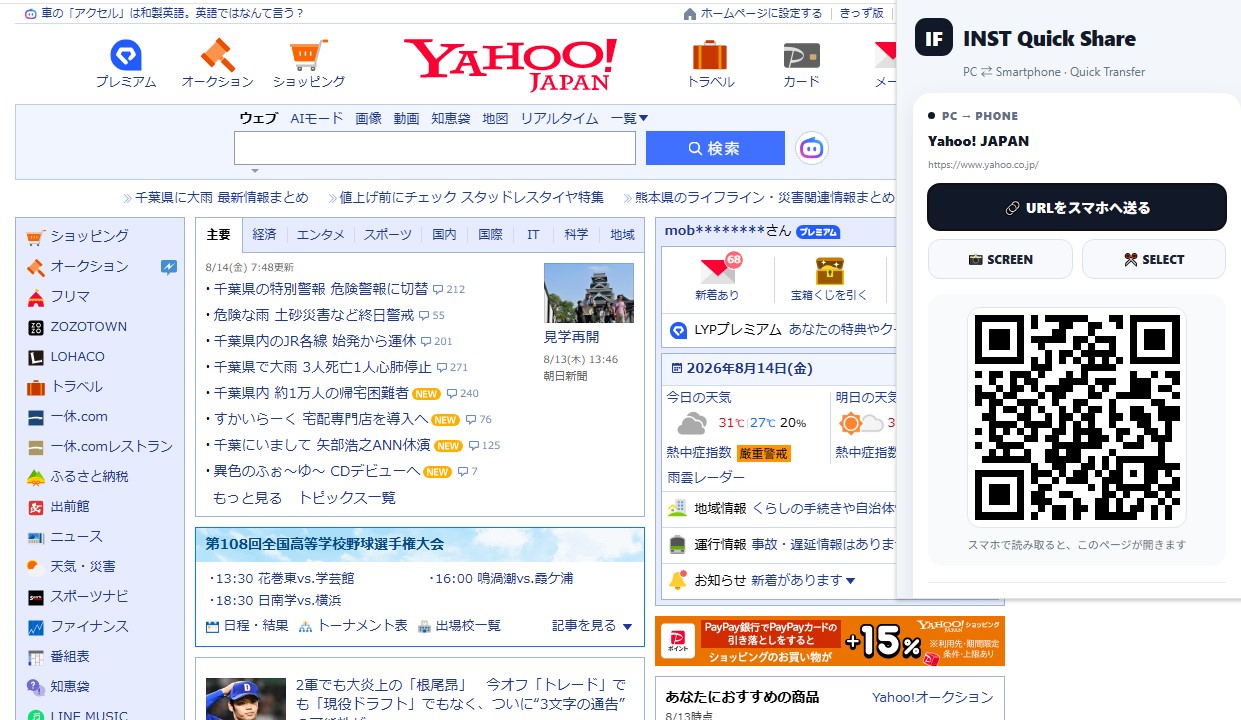
PC → Smartphone / URL Quick Transfer
FAQ
Do I need to install an app on my phone?
No. You can use your phone camera and web browser to scan the QR code.
What can I send from my PC?
You can send URLs, screenshots of the current page and selected-area images to your phone.
Can I send content from my phone to my PC?
Yes. You can send images, photos, URLs and text directly to your PC.
Are shared images stored permanently?
No. Temporary images are automatically deleted from the server after a limited period.
Does QR generation use an external service?
No. QR codes are generated locally inside the Chrome extension.
Is INST Quick Share free?
Yes. INST Quick Share is currently free to use.
Temporary Transfer Designed for Sharing.
QR codes are generated locally inside the extension. Shared images are stored temporarily and automatically deleted after a limited period. No dedicated mobile app is required.
PC & Phone Sharing Guides
Learn simple ways to transfer URLs, screenshots, photos and other content between your PC and phone.
Make PC ⇄ Phone Sharing Faster.
Reduce self-messaging, email attachments and temporary cloud uploads. Share directly with QR codes.
Download INST Quick Share